
三步取得檔案
開啟影片
「下載」按鈕已經在影片下方——就在「分享」旁邊。
選擇畫質
就在頁面上:最高 4K,或只下載音訊。
取得檔案
檔案會自動儲存到「下載」資料夾——你可以直接關閉分頁。
背景下載
關掉分頁,檔案照樣送到
- 下載由我們的伺服器 q-saver.com 完成,而不是你的瀏覽器
- 進度會顯示在網址列旁的 QSaver 圖示上
- 下載完成的檔案會自動存到「下載」資料夾——只會存一次,不論開了多少個分頁
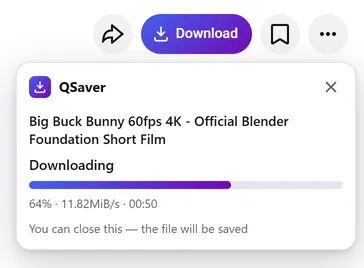
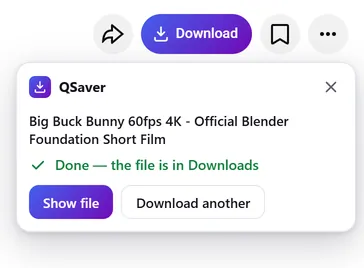
隨時可用
所有下載集中在同一個視窗
- 點擊 QSaver 圖示,查看每個檔案的百分比與速度
- 直接把連結貼到視窗裡,不必開啟網站
- 在連結上按右鍵——「從連結下載影片」
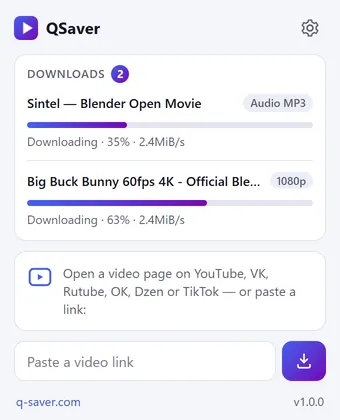
一個按鈕,12 個網站
它就放在「分享」旁邊,彷彿原本就在那裡。在 Shorts 和 TikTok 上,則是右側欄裡的圓形按鈕。









還有更多網站——沒有截圖,按鈕都一樣: X Reddit Pinterest Bilibili
右鍵選單
在影片連結上——「從連結下載影片」,在影片頁面上——「下載此影片」。
更多網站——透過圖示
Mail.ru、Tumblr、Weibo、NTV 等:把連結貼到 QSaver 視窗,或在連結上按右鍵。
按鈕由你決定
可顯示「下載」字樣,也可只顯示圖示。不需要的網站可在設定中關閉。
你的語言
24 種介面語言,可在擴充功能設定中變更。
一覽
常見問題
擴充功能本身免費。未登入時每天可下載 3 部影片(最高 720p),登入 q-saver.com 後為 5 部。更多下載次數、1080p–4K 畫質與 MP3 需要訂閱:擴充功能會使用你 q-saver.com 帳戶的方案。
目前僅支援桌面版 Firefox(140 及更新版本)。Opera 與 Yandex Browser 的擴充功能正在 Opera 附加元件目錄審核中;Chrome 與 Edge 暫時還沒有。在其他瀏覽器和手機上,請到網站下載。
在影片下方的按鈕列中,就在「分享」旁邊。在 Shorts 和 TikTok 上,是右側欄裡的圓形按鈕。上方的截圖顯示了它在各個網站上的位置。沒看到?請重新整理頁面。
如果暫時無法直接在頁面上下載,按鈕會帶著這部影片開啟 q-saver.com——在那裡一切照常。你也可以自己前往:面板中的「在 q-saver.com 開啟」。
點擊「重試」,或在網站上開啟該影片。還是不行?請把影片連結傳給客服,我們會查看。
在工具列的 QSaver 圖示上按右鍵 →「移除」。也可以在瀏覽器的擴充功能頁面中操作。
擴充功能隱私權說明
- The extension does not collect browsing history. On a video page it only finds the site's row of buttons to place its own next to them — it stores and transmits nothing from the page.
- On its own — at installation, at browser start and every few hours — the extension only asks q-saver.com where to place the button on each site: the answer describes places on the page (which element to find and where to stand), not code. This request carries no cookies and no page addresses — only the extension version. This keeps the button in place when a site changes its layout, without a new extension version.
- The video address goes to q-saver.com only when you press Download yourself — the on-page button, the extension window or the right-click menu. It is the same as pasting the link on the site: the server finds the video, downloads it and hands you the file. Requests carry your q-saver.com sign-in (the site's cookies) so that your plan and limits apply. From there the site's Privacy Policy applies.
- After installation the extension opens this page once, and after removal the browser opens it marked “removed” — that is how we count installs and removals. You may mark a reason for removal on this page — it is sent to the site only if you click it.
- When you open the extension window, it asks q-saver.com for your name, plan and downloads left today — with your sign-in on the site, like the site's header; the page address is not sent.
- The extension stores in the browser its own settings (language, button style, sites), the site's messages in your language, the button places and — until the browser is closed — the state of downloads in progress and your plan for the window.
- No ads, no analytics and no remotely loaded code — everything the extension does is in its package.
- Permissions: access to the tab when you click the icon (activeTab) — to read the video address; data on YouTube, VK, Rutube, OK, Dzen, TikTok, Twitch, Instagram, X, Reddit, Pinterest, Bilibili and Yandex video search pages — only to place the Download button on a video page; access to q-saver.com — to check what your plan allows, start the download and fetch the file; downloads — to save the finished file to Downloads; alarms — while a download is in progress, to wake the extension so the file is saved even after the tab is closed; context menu and storage — the right-click items and settings.