Tarayıcı eklentisi
Videonun hemen altında İndir düğmesi
Videonun altındaki düğmeye tıklayın, kaliteyi seçin — dosya kendiliğinden kaydedilir. Bağlantı kopyalamaya da, siteye gitmeye de gerek yok.
Şu tarayıcılar için hazır: Firefox
Opera ve Yandex Browser — inceleniyor; diğer tarayıcılar için henüz eklenti yok.
- Ücretsiz
- Kayıt gerekmez
- Reklam yok

Dosyanıza üç adımda ulaşın
Bir video açın
İndir düğmesi zaten videonun altında — Paylaş'ın yanında.
Kaliteyi seçin
Doğrudan sayfada: 4K'ya kadar veya yalnızca ses.
Dosyayı alın
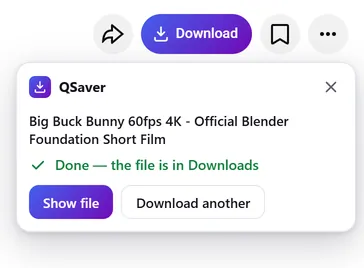
İndirilenler klasörüne kendiliğinden kaydedilir — sekmeyi kapatabilirsiniz.
Arka planda indirme
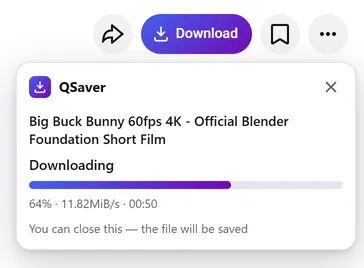
Sekmeyi kapatın — dosya yine de gelir
- İndirmeyi tarayıcınız değil, sunucumuz q-saver.com yapar
- İlerleme, adres çubuğunun yanındaki QSaver simgesinde görünür
- Biten dosya kendiliğinden İndirilenler'e düşer — kaç sekme açık olursa olsun yalnızca bir kez
Her zaman elinizin altında
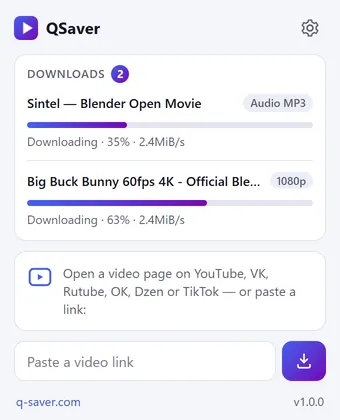
Tüm indirmeler tek pencerede
- QSaver simgesine tıklayın — her dosyanın yüzdesi ve hızı görünür
- Bağlantıyı doğrudan pencereye yapıştırın — siteyi açmanıza gerek yok
- Bir bağlantıya sağ tıklayın — “Bağlantıdaki videoyu indir”
Tek düğme — 12 site
Paylaş'ın yanında sanki hep oradaymış gibi durur. Shorts ve TikTok'ta — sağ sütunda yuvarlak bir düğme.









Ve daha fazlası — ekran görüntüsü yok, düğme aynı: X Reddit Pinterest Bilibili
Sağ tık menüsü
Video bağlantısında — “Bağlantıdaki videoyu indir”, video sayfasında — “Bu videoyu indir”.
Daha fazla site — simge üzerinden
Mail.ru, Tumblr, Weibo, NTV ve diğerleri: bağlantıyı QSaver penceresine yapıştırın veya bağlantıya sağ tıklayın.
Düğme sizin, tarz sizin
“İndir” yazısıyla ya da yalnızca simgeyle. İhtiyacınız olmayan siteleri ayarlardan kapatın.
Kendi dilinizde
24 arayüz dili. Eklenti ayarlarından değiştirin.
Kısaca
Sorular
Eklenti ücretsizdir. Giriş yapmadan — günde 720p'ye kadar 3 video, q-saver.com'a giriş yapınca — 5 video. Daha fazla indirme, 1080p–4K ve MP3 abonelikle gelir: eklenti, q-saver.com hesabınızdaki planı kullanır.
Şu anda — masaüstünde Firefox (140 ve üzeri sürüm). Opera ve Yandex Browser için eklenti, Opera eklenti kataloğunda inceleniyor; Chrome ve Edge için henüz yok. Diğer tarayıcılarda ve telefonda web sitesinden indirin.
Videonun altındaki düğme sırasında, Paylaş'ın yanında. Shorts ve TikTok'ta — sağ sütunda yuvarlak bir düğme. Yukarıdaki ekran görüntüleri düğmenin her sitede nerede durduğunu gösteriyor. Görmüyor musunuz? Sayfayı yenileyin.
Sayfada doğrudan indirme o an mümkün değilse, düğme bu videoyla q-saver.com'u açar — orada her şey her zamanki gibi çalışır. Oraya kendiniz de gidebilirsiniz: panelde “q-saver.com'da aç”.
“Tekrar dene”ye basın veya videoyu web sitesinde açın. Hâlâ olmuyor mu? Video bağlantısıyla birlikte destek ekibine yazın — bakacağız.
Araç çubuğundaki QSaver simgesine sağ tıklayın → “Kaldır”. Ya da tarayıcının eklentiler sayfasını kullanın.
Doğrudan sayfadan indirin
QSaver'ı ekleyin — İndir düğmesi videonun altında belirir.
Şu tarayıcılar için hazır: Firefox
Opera ve Yandex Browser — inceleniyor; diğer tarayıcılar için henüz eklenti yok.
Eklenti gizliliği
- The extension does not collect browsing history. On a video page it only finds the site's row of buttons to place its own next to them — it stores and transmits nothing from the page.
- On its own — at installation, at browser start and every few hours — the extension only asks q-saver.com where to place the button on each site: the answer describes places on the page (which element to find and where to stand), not code. This request carries no cookies and no page addresses — only the extension version. This keeps the button in place when a site changes its layout, without a new extension version.
- The video address goes to q-saver.com only when you press Download yourself — the on-page button, the extension window or the right-click menu. It is the same as pasting the link on the site: the server finds the video, downloads it and hands you the file. Requests carry your q-saver.com sign-in (the site's cookies) so that your plan and limits apply. From there the site's Privacy Policy applies.
- After installation the extension opens this page once, and after removal the browser opens it marked “removed” — that is how we count installs and removals. You may mark a reason for removal on this page — it is sent to the site only if you click it.
- When you open the extension window, it asks q-saver.com for your name, plan and downloads left today — with your sign-in on the site, like the site's header; the page address is not sent.
- The extension stores in the browser its own settings (language, button style, sites), the site's messages in your language, the button places and — until the browser is closed — the state of downloads in progress and your plan for the window.
- No ads, no analytics and no remotely loaded code — everything the extension does is in its package.
- Permissions: access to the tab when you click the icon (activeTab) — to read the video address; data on YouTube, VK, Rutube, OK, Dzen, TikTok, Twitch, Instagram, X, Reddit, Pinterest, Bilibili and Yandex video search pages — only to place the Download button on a video page; access to q-saver.com — to check what your plan allows, start the download and fetch the file; downloads — to save the finished file to Downloads; alarms — while a download is in progress, to wake the extension so the file is saved even after the tab is closed; context menu and storage — the right-click items and settings.