
三步拿到文件
打开视频
“下载”按钮已经在视频下方——就在“分享”旁边。
选择画质
就在页面上:最高 4K,或只下载音频。
获取文件
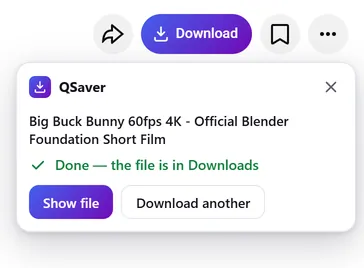
文件会自动保存到“下载”文件夹——你可以直接关闭标签页。
后台下载
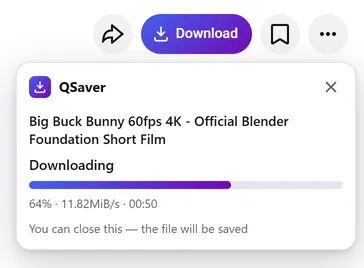
关掉标签页,文件照样送到
- 下载由我们的服务器 q-saver.com 完成,而不是你的浏览器
- 进度显示在地址栏旁边的 QSaver 图标上
- 下载好的文件会自动保存到“下载”文件夹——只保存一次,无论打开了多少个标签页
随时可用
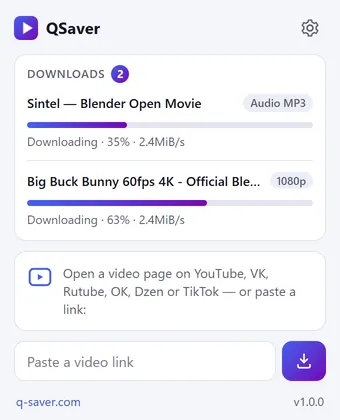
所有下载集中在一个窗口
- 点击 QSaver 图标,查看每个文件的百分比和速度
- 直接把链接粘贴到窗口里,无需打开网站
- 右键点击链接——“从链接下载视频”
一个按钮,12 个网站
它就放在“分享”旁边,仿佛原本就在那里。在 Shorts 和 TikTok 上,则是右侧栏里的圆形按钮。









还有更多网站——没有截图,按钮都一样: X Reddit Pinterest Bilibili
右键菜单
在视频链接上——“从链接下载视频”,在视频页面上——“下载此视频”。
更多网站——通过图标
Mail.ru、Tumblr、Weibo、NTV 等:把链接粘贴到 QSaver 窗口,或在链接上点右键。
按钮随你定
可显示“下载”字样,也可只显示图标。不需要的网站可在设置中关闭。
你的语言
24 种界面语言,可在扩展设置中更改。
一览
常见问题
扩展本身免费。未登录时每天可下载 3 个视频(最高 720p),登录 q-saver.com 后为 5 个。更多下载次数、1080p–4K 画质和 MP3 需要订阅:扩展会使用你 q-saver.com 账户的套餐。
目前仅支持桌面版 Firefox(140 及更高版本)。Opera 和 Yandex Browser 的扩展正在 Opera 附加组件目录审核中;Chrome 和 Edge 暂时还没有。在其他浏览器和手机上,请到网站下载。
在视频下方的按钮行里,就在“分享”旁边。在 Shorts 和 TikTok 上,是右侧栏里的圆形按钮。上方的截图展示了它在各个网站上的位置。没看到?请刷新页面。
如果暂时无法直接在页面上下载,按钮会带着这个视频打开 q-saver.com——在那里一切照常。你也可以自己前往:面板里的“在 q-saver.com 打开”。
点击“重试”,或在网站上打开该视频。还是不行?请把视频链接发给客服,我们会查看。
右键点击工具栏中的 QSaver 图标 →“移除”。也可以在浏览器的扩展页面中操作。
扩展隐私说明
- The extension does not collect browsing history. On a video page it only finds the site's row of buttons to place its own next to them — it stores and transmits nothing from the page.
- On its own — at installation, at browser start and every few hours — the extension only asks q-saver.com where to place the button on each site: the answer describes places on the page (which element to find and where to stand), not code. This request carries no cookies and no page addresses — only the extension version. This keeps the button in place when a site changes its layout, without a new extension version.
- The video address goes to q-saver.com only when you press Download yourself — the on-page button, the extension window or the right-click menu. It is the same as pasting the link on the site: the server finds the video, downloads it and hands you the file. Requests carry your q-saver.com sign-in (the site's cookies) so that your plan and limits apply. From there the site's Privacy Policy applies.
- After installation the extension opens this page once, and after removal the browser opens it marked “removed” — that is how we count installs and removals. You may mark a reason for removal on this page — it is sent to the site only if you click it.
- When you open the extension window, it asks q-saver.com for your name, plan and downloads left today — with your sign-in on the site, like the site's header; the page address is not sent.
- The extension stores in the browser its own settings (language, button style, sites), the site's messages in your language, the button places and — until the browser is closed — the state of downloads in progress and your plan for the window.
- No ads, no analytics and no remotely loaded code — everything the extension does is in its package.
- Permissions: access to the tab when you click the icon (activeTab) — to read the video address; data on YouTube, VK, Rutube, OK, Dzen, TikTok, Twitch, Instagram, X, Reddit, Pinterest, Bilibili and Yandex video search pages — only to place the Download button on a video page; access to q-saver.com — to check what your plan allows, start the download and fetch the file; downloads — to save the finished file to Downloads; alarms — while a download is in progress, to wake the extension so the file is saved even after the tab is closed; context menu and storage — the right-click items and settings.