افزونهٔ مرورگر
دکمهٔ دانلود درست زیر ویدیو
روی دکمهٔ زیر ویدیو بزنید، کیفیت را انتخاب کنید — و فایل خودش ذخیره میشود. بدون کپی کردن لینک و بدون رفتن به سایت.
هماکنون در دسترس برای: Firefox
Opera و Yandex Browser — در حال بررسی؛ برای مرورگرهای دیگر هنوز افزونهای نداریم.
- رایگان
- بدون ثبتنام
- بدون تبلیغات

سه قدم تا فایل شما
ویدیویی را باز کنید
دکمهٔ «دانلود» همین حالا زیر ویدیو است — کنار «اشتراکگذاری».
کیفیت را انتخاب کنید
همانجا روی صفحه: تا 4K، یا فقط صدا.
فایل را بگیرید
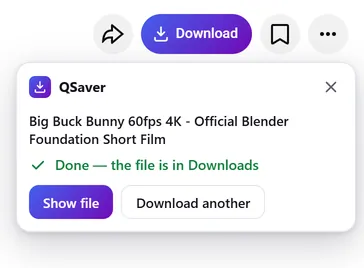
خودش در «دانلودها» ذخیره میشود — میتوانید تب را ببندید.
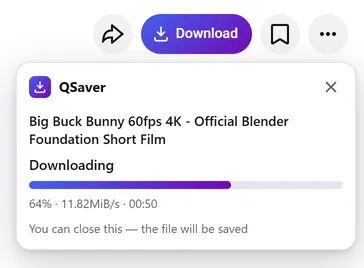
دانلود در پسزمینه
تب را ببندید — فایل باز هم میرسد
- دانلود را سرور ما q-saver.com انجام میدهد، نه مرورگر شما
- پیشرفت روی نماد QSaver کنار نوار آدرس نمایش داده میشود
- فایل آماده خودش در «دانلودها» ذخیره میشود — فقط یک بار، هر چند تب باز باشد
همیشه در دسترس
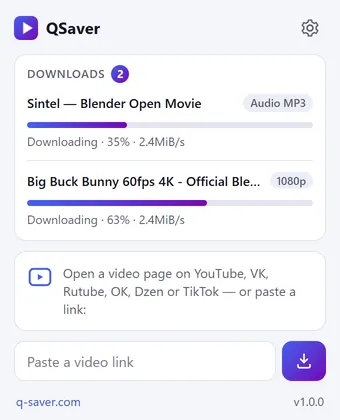
همهٔ دانلودها در یک پنجره
- روی نماد QSaver کلیک کنید — درصد و سرعت هر فایل
- لینک را مستقیم در پنجره بچسبانید — نیازی به باز کردن سایت نیست
- روی یک لینک راستکلیک کنید — «دانلود ویدیو از پیوند»
یک دکمه — 12 سایت
کنار «اشتراکگذاری» نشسته، انگار همیشه همانجا بوده. در Shorts و TikTok — یک دکمهٔ گرد در ستون سمت راست.









و سایتهای دیگر — بدون اسکرینشات، همان دکمه: X Reddit Pinterest Bilibili
منوی راستکلیک
روی لینک ویدیو — «دانلود ویدیو از پیوند»، روی صفحهٔ ویدیو — «دانلود این ویدیو».
سایتهای بیشتر — از طریق نماد
Mail.ru، Tumblr، Weibo، NTV و دیگر سایتها: لینک را در پنجرهٔ QSaver بچسبانید یا روی آن راستکلیک کنید.
دکمه، به سلیقهٔ شما
با کلمهٔ «دانلود» یا فقط نماد. سایتهایی را که لازم ندارید در تنظیمات خاموش کنید.
به زبان شما
24 زبان رابط کاربری. در تنظیمات افزونه تغییرش دهید.
خلاصه
پرسشها
افزونه رایگان است. بدون ورود — 3 ویدیو در روز تا کیفیت 720p، و با ورود به q-saver.com — 5 ویدیو. دانلود بیشتر، کیفیت 1080p تا 4K و MP3 با اشتراک در دسترس است: افزونه از پلن حساب شما در q-saver.com استفاده میکند.
فعلاً — Firefox روی دسکتاپ (نسخهٔ 140 و بالاتر). برای Opera و Yandex Browser افزونه در فهرست افزونههای Opera در حال بررسی است؛ برای Chrome و Edge هنوز نسخهای وجود ندارد. در مرورگرهای دیگر و روی گوشی، از طریق سایت دانلود کنید.
در ردیف دکمههای زیر ویدیو، کنار «اشتراکگذاری». در Shorts و TikTok — یک دکمهٔ گرد در ستون سمت راست. اسکرینشاتهای بالا نشان میدهند در هر سایت کجا قرار دارد. نمیبینید؟ صفحه را دوباره بارگذاری کنید.
اگر دانلود مستقیم روی همان صفحه فعلاً ممکن نباشد، دکمه q-saver.com را با همین ویدیو باز میکند — آنجا همهچیز مثل همیشه کار میکند. خودتان هم میتوانید به آنجا بروید: «باز کردن در q-saver.com» در پنل.
روی «تلاش دوباره» بزنید یا ویدیو را در سایت باز کنید. هنوز مشکل دارید؟ لینک ویدیو را برای پشتیبانی بفرستید — بررسی میکنیم.
روی نماد QSaver در نوار ابزار راستکلیک کنید ← «حذف». یا از صفحهٔ افزونههای مرورگر استفاده کنید.
مستقیم از همان صفحه دانلود کنید
QSaver را اضافه کنید — و دکمهٔ «دانلود» زیر ویدیو ظاهر میشود.
هماکنون در دسترس برای: Firefox
Opera و Yandex Browser — در حال بررسی؛ برای مرورگرهای دیگر هنوز افزونهای نداریم.
حریم خصوصی افزونه
- The extension does not collect browsing history. On a video page it only finds the site's row of buttons to place its own next to them — it stores and transmits nothing from the page.
- On its own — at installation, at browser start and every few hours — the extension only asks q-saver.com where to place the button on each site: the answer describes places on the page (which element to find and where to stand), not code. This request carries no cookies and no page addresses — only the extension version. This keeps the button in place when a site changes its layout, without a new extension version.
- The video address goes to q-saver.com only when you press Download yourself — the on-page button, the extension window or the right-click menu. It is the same as pasting the link on the site: the server finds the video, downloads it and hands you the file. Requests carry your q-saver.com sign-in (the site's cookies) so that your plan and limits apply. From there the site's Privacy Policy applies.
- After installation the extension opens this page once, and after removal the browser opens it marked “removed” — that is how we count installs and removals. You may mark a reason for removal on this page — it is sent to the site only if you click it.
- When you open the extension window, it asks q-saver.com for your name, plan and downloads left today — with your sign-in on the site, like the site's header; the page address is not sent.
- The extension stores in the browser its own settings (language, button style, sites), the site's messages in your language, the button places and — until the browser is closed — the state of downloads in progress and your plan for the window.
- No ads, no analytics and no remotely loaded code — everything the extension does is in its package.
- Permissions: access to the tab when you click the icon (activeTab) — to read the video address; data on YouTube, VK, Rutube, OK, Dzen, TikTok, Twitch, Instagram, X, Reddit, Pinterest, Bilibili and Yandex video search pages — only to place the Download button on a video page; access to q-saver.com — to check what your plan allows, start the download and fetch the file; downloads — to save the finished file to Downloads; alarms — while a download is in progress, to wake the extension so the file is saved even after the tab is closed; context menu and storage — the right-click items and settings.