Ekstensi browser
Tombol Unduh tepat di bawah video
Klik tombol di bawah video, pilih kualitas — dan file tersimpan dengan sendirinya. Tanpa menyalin link, tanpa perlu membuka situs.
Sudah tersedia untuk: Firefox
Opera dan Yandex Browser — sedang ditinjau; untuk browser lain belum ada ekstensinya.
- Gratis
- Tanpa daftar
- Tanpa iklan

Tiga langkah menuju file Anda
Buka video
Tombol Unduh sudah ada di bawah video — di samping tombol Bagikan.
Pilih kualitas
Langsung di halaman: hingga 4K, atau audio saja.
Dapatkan file
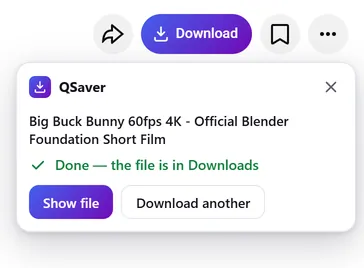
File tersimpan sendiri di folder Unduhan — tab boleh ditutup.
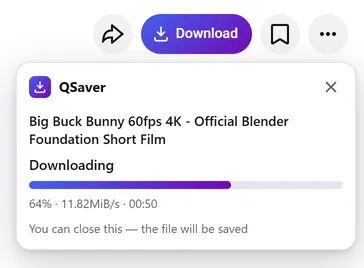
Download di latar belakang
Tutup tab — file tetap akan sampai
- Server kami q-saver.com yang mendownload, bukan browser Anda
- Progres tampil di ikon QSaver di samping bilah alamat
- File yang sudah selesai masuk ke folder Unduhan dengan sendirinya — cukup sekali, berapa pun tab yang terbuka
Selalu dalam jangkauan
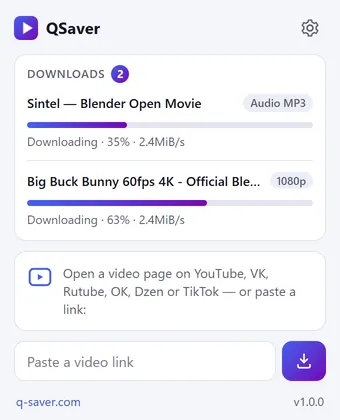
Semua download dalam satu jendela
- Klik ikon QSaver — persentase dan kecepatan setiap file
- Tempel link langsung di jendela ini — tidak perlu membuka situs
- Klik kanan sebuah link — “Unduh video dari tautan”
Satu tombol — 12 situs
Letaknya di samping tombol Bagikan, seolah memang bagian dari halamannya. Di Shorts dan TikTok — tombol bulat di kolom kanan.









Dan situs lainnya — tanpa tangkapan layar, tombolnya sama: X Reddit Pinterest Bilibili
Menu klik kanan
Pada link video — “Unduh video dari tautan”, pada halaman video — “Unduh video ini”.
Situs lain — lewat ikon
Mail.ru, Tumblr, Weibo, NTV, dan lainnya: tempel link di jendela QSaver atau klik kanan link-nya.
Tombol sesuai selera Anda
Dengan tulisan “Unduh” atau hanya ikon. Matikan situs yang tidak Anda perlukan di pengaturan.
Dalam bahasa Anda
24 bahasa antarmuka. Ganti di pengaturan ekstensi.
Singkatnya
Pertanyaan
Ekstensi ini gratis. Tanpa masuk akun — 3 video per hari hingga 720p, setelah masuk ke q-saver.com — 5. Lebih banyak download, 1080p–4K, dan MP3 tersedia lewat langganan: ekstensi memakai paket dari akun q-saver.com Anda.
Saat ini — Firefox di desktop (versi 140 ke atas). Untuk Opera dan Yandex Browser, ekstensi sedang ditinjau di katalog add-on Opera; untuk Chrome dan Edge belum tersedia. Di browser lain dan di ponsel, download lewat situs.
Di deretan tombol di bawah video, di samping tombol Bagikan. Di Shorts dan TikTok — tombol bulat di kolom sebelah kanan. Tangkapan layar di atas menunjukkan posisinya di tiap situs. Tidak terlihat? Muat ulang halaman.
Jika download langsung di halaman sedang tidak tersedia, tombol akan membuka q-saver.com dengan video ini — di sana semuanya berjalan seperti biasa. Anda juga bisa ke sana sendiri: “Buka di q-saver.com” di panel.
Tekan “Coba lagi” atau buka video di situs. Masih bermasalah? Tulis ke dukungan beserta link videonya — kami akan memeriksanya.
Klik kanan ikon QSaver di toolbar → “Hapus”. Atau lewat halaman ekstensi di browser Anda.
Download langsung dari halaman
Tambahkan QSaver — dan tombol Unduh muncul di bawah video.
Sudah tersedia untuk: Firefox
Opera dan Yandex Browser — sedang ditinjau; untuk browser lain belum ada ekstensinya.
Privasi ekstensi
- The extension does not collect browsing history. On a video page it only finds the site's row of buttons to place its own next to them — it stores and transmits nothing from the page.
- On its own — at installation, at browser start and every few hours — the extension only asks q-saver.com where to place the button on each site: the answer describes places on the page (which element to find and where to stand), not code. This request carries no cookies and no page addresses — only the extension version. This keeps the button in place when a site changes its layout, without a new extension version.
- The video address goes to q-saver.com only when you press Download yourself — the on-page button, the extension window or the right-click menu. It is the same as pasting the link on the site: the server finds the video, downloads it and hands you the file. Requests carry your q-saver.com sign-in (the site's cookies) so that your plan and limits apply. From there the site's Privacy Policy applies.
- After installation the extension opens this page once, and after removal the browser opens it marked “removed” — that is how we count installs and removals. You may mark a reason for removal on this page — it is sent to the site only if you click it.
- When you open the extension window, it asks q-saver.com for your name, plan and downloads left today — with your sign-in on the site, like the site's header; the page address is not sent.
- The extension stores in the browser its own settings (language, button style, sites), the site's messages in your language, the button places and — until the browser is closed — the state of downloads in progress and your plan for the window.
- No ads, no analytics and no remotely loaded code — everything the extension does is in its package.
- Permissions: access to the tab when you click the icon (activeTab) — to read the video address; data on YouTube, VK, Rutube, OK, Dzen, TikTok, Twitch, Instagram, X, Reddit, Pinterest, Bilibili and Yandex video search pages — only to place the Download button on a video page; access to q-saver.com — to check what your plan allows, start the download and fetch the file; downloads — to save the finished file to Downloads; alarms — while a download is in progress, to wake the extension so the file is saved even after the tab is closed; context menu and storage — the right-click items and settings.