ब्राउज़र एक्सटेंशन
वीडियो के ठीक नीचे डाउनलोड बटन
वीडियो के नीचे दिए बटन पर क्लिक करें, क्वालिटी चुनें — और फ़ाइल अपने आप सेव हो जाएगी। न लिंक कॉपी करने का झंझट, न साइट पर जाने की ज़रूरत।
इनके लिए पहले से उपलब्ध: Firefox
Opera और Yandex Browser — समीक्षा में है; अन्य ब्राउज़र के लिए अभी एक्सटेंशन नहीं है।
- मुफ़्त
- बिना साइन-अप
- बिना विज्ञापन

फ़ाइल तक तीन कदम
कोई वीडियो खोलें
डाउनलोड बटन वीडियो के नीचे पहले से मौजूद है — शेयर बटन के बगल में।
क्वालिटी चुनें
सीधे पेज पर: 4K तक, या सिर्फ़ ऑडियो।
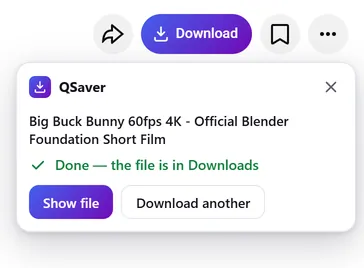
फ़ाइल पाएँ
वह अपने आप डाउनलोड फ़ोल्डर में सेव हो जाती है — आप टैब बंद कर सकते हैं।
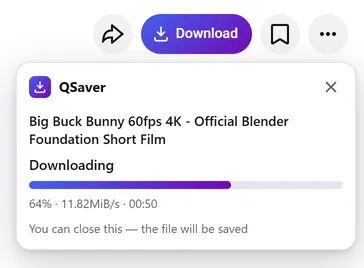
बैकग्राउंड में डाउनलोड
टैब बंद कर दें — फ़ाइल फिर भी आ जाएगी
- डाउनलोड हमारा सर्वर q-saver.com करता है, आपका ब्राउज़र नहीं
- प्रोग्रेस एड्रेस बार के पास QSaver आइकन पर दिखती है
- तैयार फ़ाइल अपने आप डाउनलोड फ़ोल्डर में आ जाती है — सिर्फ़ एक बार, चाहे कितने भी टैब खुले हों
हमेशा हाथ में
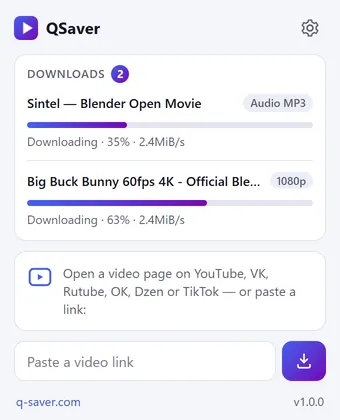
सारे डाउनलोड एक ही विंडो में
- QSaver आइकन पर क्लिक करें — हर फ़ाइल का प्रतिशत और स्पीड दिखेगी
- लिंक सीधे विंडो में पेस्ट करें — साइट खोलने की ज़रूरत नहीं
- किसी लिंक पर राइट-क्लिक करें — “लिंक से वीडियो डाउनलोड करें”
एक बटन — 12 साइटें
यह शेयर बटन के बगल में ऐसे बैठता है जैसे वहीं का हो। Shorts और TikTok में — दाएँ कॉलम में गोल बटन।









और भी साइटें — स्क्रीनशॉट के बिना, बटन वही: X Reddit Pinterest Bilibili
राइट-क्लिक मेनू
वीडियो के लिंक पर — “लिंक से वीडियो डाउनलोड करें”, वीडियो के पेज पर — “यह वीडियो डाउनलोड करें”।
और साइटें — आइकन से
Mail.ru, Tumblr, Weibo, NTV और अन्य: लिंक को QSaver विंडो में पेस्ट करें या उस पर राइट-क्लिक करें।
आपका बटन, आपके अंदाज़ में
“डाउनलोड” शब्द के साथ या सिर्फ़ आइकन। जो साइटें नहीं चाहिए, उन्हें सेटिंग्स में बंद कर दें।
आपकी भाषा में
इंटरफ़ेस के लिए 24 भाषाएँ। एक्सटेंशन की सेटिंग्स में बदलें।
संक्षेप में
सवाल-जवाब
एक्सटेंशन मुफ़्त है। साइन इन किए बिना — रोज़ 720p तक के 3 वीडियो, q-saver.com पर साइन इन करने पर — 5। ज़्यादा डाउनलोड, 1080p–4K और MP3 सब्सक्रिप्शन के साथ मिलते हैं: एक्सटेंशन आपके q-saver.com अकाउंट के प्लान का इस्तेमाल करता है।
फ़िलहाल — डेस्कटॉप पर Firefox (वर्शन 140 और उससे नया) में। Opera और Yandex Browser के लिए एक्सटेंशन Opera ऐड-ऑन कैटलॉग में समीक्षा में है; Chrome और Edge के लिए अभी नहीं है। अन्य ब्राउज़र में और फ़ोन पर वेबसाइट से डाउनलोड करें।
वीडियो के नीचे बटनों की पंक्ति में, शेयर बटन के बगल में। Shorts और TikTok में — दाएँ कॉलम में गोल बटन। ऊपर के स्क्रीनशॉट में दिखाया गया है कि हर साइट पर यह कहाँ होता है। नहीं दिख रहा? पेज रीलोड करें।
अगर पेज पर ही डाउनलोड करना अभी संभव नहीं है, तो बटन इसी वीडियो के साथ q-saver.com खोल देता है — वहाँ सब कुछ हमेशा की तरह चलता है। आप खुद भी वहाँ जा सकते हैं: पैनल में “q-saver.com पर खोलें”।
“फिर से कोशिश करें” दबाएँ या वीडियो को वेबसाइट पर खोलें। फिर भी नहीं हुआ? वीडियो के लिंक के साथ सहायता को लिखें — हम देखेंगे।
टूलबार में QSaver आइकन पर राइट-क्लिक करें → “हटाएँ”। या ब्राउज़र के एक्सटेंशन पेज का इस्तेमाल करें।
सीधे पेज से डाउनलोड करें
QSaver जोड़ें — और वीडियो के नीचे डाउनलोड बटन आ जाएगा।
इनके लिए पहले से उपलब्ध: Firefox
Opera और Yandex Browser — समीक्षा में है; अन्य ब्राउज़र के लिए अभी एक्सटेंशन नहीं है।
एक्सटेंशन की गोपनीयता
- The extension does not collect browsing history. On a video page it only finds the site's row of buttons to place its own next to them — it stores and transmits nothing from the page.
- On its own — at installation, at browser start and every few hours — the extension only asks q-saver.com where to place the button on each site: the answer describes places on the page (which element to find and where to stand), not code. This request carries no cookies and no page addresses — only the extension version. This keeps the button in place when a site changes its layout, without a new extension version.
- The video address goes to q-saver.com only when you press Download yourself — the on-page button, the extension window or the right-click menu. It is the same as pasting the link on the site: the server finds the video, downloads it and hands you the file. Requests carry your q-saver.com sign-in (the site's cookies) so that your plan and limits apply. From there the site's Privacy Policy applies.
- After installation the extension opens this page once, and after removal the browser opens it marked “removed” — that is how we count installs and removals. You may mark a reason for removal on this page — it is sent to the site only if you click it.
- When you open the extension window, it asks q-saver.com for your name, plan and downloads left today — with your sign-in on the site, like the site's header; the page address is not sent.
- The extension stores in the browser its own settings (language, button style, sites), the site's messages in your language, the button places and — until the browser is closed — the state of downloads in progress and your plan for the window.
- No ads, no analytics and no remotely loaded code — everything the extension does is in its package.
- Permissions: access to the tab when you click the icon (activeTab) — to read the video address; data on YouTube, VK, Rutube, OK, Dzen, TikTok, Twitch, Instagram, X, Reddit, Pinterest, Bilibili and Yandex video search pages — only to place the Download button on a video page; access to q-saver.com — to check what your plan allows, start the download and fetch the file; downloads — to save the finished file to Downloads; alarms — while a download is in progress, to wake the extension so the file is saved even after the tab is closed; context menu and storage — the right-click items and settings.